
Meta Expands Experimental Edits Features in Beta Tab
Meta has added several experimental video editing features to the beta tab of its Edits app, available for early testing by creators. New tools include speed curves for dynamic ramping, one-tap color correction, project folders on iOS and Android, and adjustable layers for Android users. These features are off by default and can be toggled on, with feedback collected via a shake gesture.
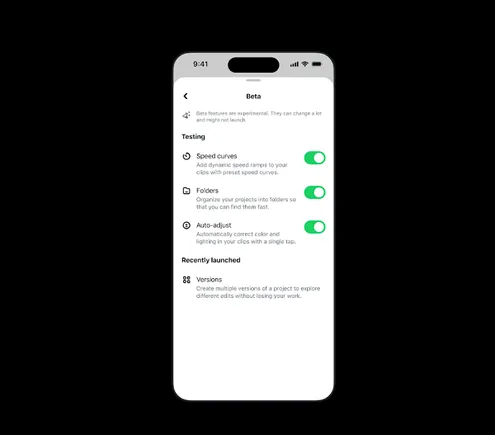
Meta is rolling out additional experimental video editing capabilities to the beta tab of its Edits application, giving creators early access to tools designed to streamline their workflows. The newly updated features include speed ramping, color-correction adjustments, and an enhanced method for managing ongoing projects.
In a press release seen by SMT, Meta detailed how users can access the beta tab, which first launched in June. The company explained the purpose of this section: “The Beta tab is a dedicated section in Edits where upcoming features are available for early testing. Features are off by default; creators can choose to toggle them on, try them out, and shake their phone to send feedback. It's how we build Edits alongside creators, giving them agency to shape the app into what will work best for them.”

Among the new beta features on iOS is the introduction of speed curves, which Meta says will enable “precise, dynamic speed ramping along a customizable curve.” This addition addresses one of the most frequently requested video editing tools, particularly among short-form video creators.
Meta is also testing a one-tap color correction option that automatically optimizes exposure, contrast, and tone within video projects. This feature aims to reduce manual adjustment time for creators.
Additionally, the company is experimenting with folders on both iOS and Android, offering creators an alternative way to manage multiple projects simultaneously by saving them into separate areas within the app. Meta elaborated: “Long-press to enter Organize mode and drag-and-drop your drafts into folders, making Edits feel like your own creative studio.”
Finally, Meta is bringing adjustable layers to Android users, a tool that helps maintain visual consistency across projects. The adjustable layers editing tools were previously introduced on iOS in November.
The beta tab serves as a testing ground for these features, allowing creators to preview upcoming functionality before broader release. This approach also enables Meta to collect user feedback as it continues to refine and improve the Edits experience, ensuring the app evolves in line with creator needs.